Showing posts with label IT Solutions. Show all posts

Saturday, February 09, 2008

72 Tips for Safe Computing

Most homes now adays will have a computer of some sort in it. Whether it is the parents work computer, student laptop or general house machine.....it is usually put through the paces.

Many people drive a car but don't have a clue what goes on under the hood. Same as a computer. It may be used for email, Internet searches, games but if some extra pop up boxes appear or if you have to find a file in the Temporary Internet folder or manually update a .dat file for your anti-virus software....HELP!

PCMag.com have put together 11 categories that cover 72 tips to help the "everyday user" have a safe experience on their computer. If you have a computer or work with a computer - take the time to read through these tips and understand them. Don't know why phishing is....then do a quick search on the Internet to find out what it means.

When I talk about security in workshops and conferences, it still amazes me how many people raise their hands when asked, who have passwords that are either their name or better yet....still "password". Have you purchased a wireless router for you house? Have you gone through to change the administrative passwords? Believe it or not....many leave the factory passwords activated.

If you use a computer .... learn what it can do and how to keep your digital information/footprint safe!

Categories:

  • The Very Minimum
  • Malware/Antivirus
  • Windows Specifics
  • Impossible Passwords
  • Phishing
  • Safe Surfing
  • Anonymity/Privacy
  • Spam and Spim
  • Kid Computing
  • Home Networks
  • Physical/Security
School Chat....
Help your parent community. I remember parent teacher night. Most of my parents talked briefly about their kids and how they were doing. Then the discussion quickly turned to "I have a few questions about my computer or network." Create some handouts from these tips for your parent/teacher evenings.

Have a friendly competition with your staff during one of your PD days. Create an internet hunt and have these tips formed in questions. Teams of teachers will have a time limit to find the questions online.

Have this information available on your school Internet for all in your school community.

Tuesday, January 29, 2008

PC World Best innovative of 2007

2007 was an interesting year in technology and innovation. PC World sums this up in an article "The 25 Most Innovative Products of the Year." Everything from a mobile phone to cloud computing....the PC, the web and mobile devices have evolved.

Some of the most innovative products that the staff at PC World selected are:

  • Google Gears
  • Apple iPhone
  • One Laptop per Child OX
  • Time Machine, in Mac OS X 10.5 (Leopard)
  • Amazon Kindle
  • NetGear Digital Entertainer HD EVA8000
  • HP TouchSmart IQ770 PC
  • AT&T Tilt
  • Facebook API
  • DeviceVM Splashtop
  • Toshiba Portege R500
  • Data Robotics Drob
  • Hybrid Hard Drives
  • Eye-Fi Card
  • Panasonic TH-42PZ700U
  • Yamaha Tenori-On
  • Zoho Notebook
  • 'In Rainbows' by Radiohead
  • IOGear Wireless USB Hub and Adapter
  • Mint.com
  • Microsoft Popfly
  • Sprint Airave
  • Ask.com
  • eXpresso
  • Kodak EasyShare All-In-One Printers
[ complete list with links ]

Classroom Chat....
A great discussion to have in your classes with your students. How have these technologies made an impact in how we learn, work, or play?

Monday, January 21, 2008

Wii used for trainee surgeons

An article on ScientistTech website writes about a group at Banner Good Samaritan Medical Center in Phoenix, Arizona that are testing Wii to be used with their surgical residents. They have found that "surgical residents performed better during simulated surgery after playing on the Wii console." The belief is....this is due to the console's "novel 'Wiimote' control system, which allows players to direct on-screen action using a wireless wand that detects acceleration in three dimensions."

Researchers found that "Wii-playing residents scored 48 per cent higher on tool control and performance than those without the Wii warm-up." They also found that some games were especially good "because players must use small, precise movements of the wand."

There is development now for game software that can be played on Wii that is specific for surgical procedures. The researchers believe that Wii has the "most potential of any console for trainee surgeons."

Read more....

Thursday, January 03, 2008

Pushing Communicaton and Collaboration to a New Level: Create, Manage and Share Presentations on the Web

One of the many great perks of being a part of the Adobe Education Leadership (AEL) program is learning about new technologies, applications or services that are up and coming. Tech Wednesday (they are "Tech Thursday" for us in the Southern Hemisphere) are live Acrobat Connect presentations that Adobe hosts almost weekly. AELs and other Adobe user groups are invited to view/participate in the presentations. They are great and range from new product releases to 3rd party customers. I wasn't able to attend the presentation live this morning, but since the live presentation was recorded through Acrobat Connect, I was able to easily view it later by accessing a web link.

This morning Mitch Grasso - the co-founder of SlideRocket was the presenter. SlideRocket is an exciting new (you can sign up for a beta account on the website) web based application that has been designed using Adobe Flex and Adobe AIR.

SlideRocket is pushing presentation desktop products like PowerPoint and KeyNote by allowing users to "design, manage and share libraries of slides and assets, and to deliver presentations in person or remotely over the web." It has many of the features you have come to use in the desktop products plus more!!!

The cool thing about SlideRocket is that you (as the publisher of the presentation) can add users with different permissions and roles. Some of the other unique aspects of SlideRocket:

  • use existing or create your own themes.
  • you can pull data in from Google spreadsheets to create charts and tables.
  • images can be uploaded to SlideRocket, pulled from your computer or in from Flickr.
  • you can add Flash Videos (.flv) and Flash Movies (.swf) to your presentations.
  • availability of a "plug-in architecture" that can be adapted and extended then shared with the SlideRocket Community.
  • the folks from SlideRocket are presently working with SalesForce.com to create some very unique work flows for the SlideRocket community.
I would encourage you to sign up for a beta account and give SlideRocket a try. I think it will be a very exciting tool that will help to introduce a unique work flow not only for corporate but for the education community as well.

Tuesday, December 04, 2007

User Interface for Personal Discovery

Sometimes a person needs to chat about things for no other purpose than they are cool or fun.

Musicovery is both that....a little web application that has been designed to connect your tastes in a visual manner.

User Interface (UI) is something that has always been important to digital designers, but I believe it is something that is going to be VERY IMPORTANT for the 21st century. A visual UI that focuses on inclusion across gender, cultural and age boundaries is one that will be successful.

Thoughts......
Is the UI for musicovery the UI of the future? What will the UI for future-proofing look like?

Saturday, October 27, 2007

One Laptop Per Child powered by One Cow

OLPC stands for "One Laptop Per Child" this is a non-profit association that is working to develop & supply a $100 laptop for children around the world.

Presently they are working with the following countries: Argentina, Brazil, Ethiopia, India, Libya, Nepal, Nigeria, Pakistan, Peru, Romania, Russia, Rwanda, Thailand, Uruguay & USA (read more about selection of countries and those waiting to enter the program.)

The laptop is called the XO, it was "created expressly for the world's poorest children, living in its most remote environments. The laptop was designed collaboratively by experts from both academia and industry" (see laptop specs).

Highlights of the XO are:

  • can be hand powered
  • light and durable
  • estimated product life: 5 yrs
  • full-time wireless router
  • 2 display modes available (low power consumption)
  • 7.5 inch TFT 1200×900 pixel screen
  • the machine overall has been designed to be power efficient...from the CPU to the display
  • built from free and open-source software
Now, what initially grabbed my attention was an article written about the OLPC experimenting on new ways to power the XO program......they are looking at "cow power."

An article written in InfoWorld discusses finalizing the design of a cow-powered generator that the XO could easily be powered from....."The goal is to develop a low-cost energy source that can be used in Indian villages."

What a great innovation!

Cows hold an honored place in Hindu society, and it is part of Hindu tradition to avoid the consumption of beef. There are an abundance of cows in India and what a great partnership this would be to help the children of India!

Some delays in production has the XO hopefully rolling off the production line for mid-November 2007 (Reuters).

Thursday, September 27, 2007

Got an idea you would like to manufacture? Ponoko can help

Create, make and trade your product ideas!

Ponoko is a really unique idea - "it's the online space for a community of creators and consumers to use a global network of digital manufacturing hardware to co-create, make and trade individualized product ideas on demand."

Ponoko attempts to cut out the "middle man" and "connects creators, consumers, digital manufacturing hardware and service providers to promote, make and trade products on Ponoko and social networking websites."

Connecting people who might other wise never get their product to market. Definitely a website service to watch!

Wednesday, September 12, 2007

Great minds from MIT, Caltech and Olin College use technology to help the poor

When I attended a full-day conference at MIT in Boston this past July it was a great experience. MIT is known for amazing research projects, IT developments and great minds that graduate to become leaders in their fields (even a few Nobel Peace Prize winners).

In a world where there is a new tech release everyday for things we want (believe me my household could do without 5 mp3 players....there are only 2 of us). Gadgets appear on the market to make our lives easier....motorized tools that peel our apples for us or light up our bathroom sinks when we move our hands under the water tap....what is driving technology? How many gadgets does a person need?

MIT senior lecturer Amy Smith has pulled together the first summit called International Development Design Summit (IDDS) "to build technologies that can improve the lives of the world’s poorest people." With MIT, Caltech and Olin College the first summit brought together 50 students, faculty and community partners from 16 countries that were "divided into teams to design technologies that address problems in different sectors including energy, agriculture, water, and health" during the week long summit.

Working in teams and guided by sector specialists and guest speakers the teams work on their solutions and present their designs at the end of the week.

The following projects were displayed at the final presentation (see article for more info):

  • An off-grid refrigeration system that uses evaporative cooling methods,
  • A microbial fuel cell that uses microbes in their natural environments to generate electricity,
  • A biodigester slurry separation system to lessen the burden of water collection,
  • A low-cost greenhouse made from recycled materials,
  • A low-cost water testing kit,
  • A pedal-powered hammer mill to produce flour from grains,
  • A system that combines the collection, transport, disinfection and delivery of drinking water,
  • A low-cost modular water filtration unit,
  • A health tracking system that uses Radio Frequency Identification, and
  • An improved cook stove that reduces smoke production built with locally available materials.

IDDS brought together innovative minds to deal with issues of real human needs!

Classroom......

Have a discussion with your students. What technology items do they have that they couldn't live without? Cellphone, mp3 player, computer?????

How can technology be used to address real human needs!

How can technology make a difference when you don't even have money to buy the basic needs such as food and shelter?

Thursday, May 24, 2007

Cool and unique projects to "make"

This first site makes me wonder if you need to be a musician, an electronics specialist or both.

Creating your first synthesizer....this would be such a great project to do with groups of students in a competition atmosphere. The Sound Maker Project website gives you all of the directions needed to create a "Weird Sound Generator " (WSG) out of just about anything, and well, people have done just that. Various pictures have been submitted by by developers who have made their WSGs out of things like lunch boxes, an IKEA key box, plastic toys, VHS plastic cases, even a stuffed teddy bear....are just a few of the great projects.

Would love to hear if anyone takes this on with their classes!
_________________________________________________

Make: technology on your time is a great website. I have spoken about it before and it is worth revisiting again. I was in San Francisco in 2005 for the FlashForward conference and I picked up the first Make magazine that was published and have been hooked on Make ever since. Published by the computer publisher O'Reilly....it is a combination of "Geek meets MacGyver" (for those of you who don't know the television character MacGyver...he was a laid back secret agent who was always in trouble with the bad guys and could make bombs out of paper clips or machine guns out of a pencil.)

Some of these unique projects are posted from avid fans or you can purchase a kit online from Make. For example, how to make your own strobe light for a camera or how about making your own USB charger for your iPod or other gadgets.
________________________________________________

And as we move into our Winter months here in New Zealand....how about a website that makes snowflakes.

Make-a-flake is a fun interactive website created with Flash. Use a pair of digital scissors to cutout and create your own snowflake which you can post to a gallery (or use a cropper tool to save to your computer).

Monday, March 19, 2007

Preparing students for future jobs that don't exist yet....

Last year I wrote about "What is the third space?" - which you can still read about on the side bar of each page in my blog "Things for Thought." At the end of the writing I wrote "Remember.....most of the jobs we are preparing our students for don't even exist yet."

A perfect example of this type of entrepreneurial future is a website I came across called Meat Team - Values in Motion. It is developed directly from the YouTube technology and success.

The belief is through the use of internal communications such as "internal tv (video programming) for, by and about your organization" a strong culture of success can be fostered. In other words have your CEO or principal on video talking about the positive aspects on being an employee for this organization.

An interesting marketing model: The MeatTeam meets the company, writes a series of scripts/stories about the company culture, sends camera equipment out to your company (which your own employees video), equipment gets sent back for MeatTeam to edit and then MeatTeam optimizes the various video stories to work on your internal/external network.

Great concept! From my own personal experience most companies/organizations really have a hard time identifying and projecting their culture/story onto the web. I found it took an outside view to watch and ask the questions to really get to the heart of what the organization culture was and what it looked like.

Video has always been a powerful medium. With the increase in broadband speed and the ability to produce great quality video even in the comfort of your home....this seems like the most natural progression.

Education:
Great model to study in a business class. Since podcasting has moved on from audio to video, many classrooms are now V-Casting and producing video teacher lectures, classroom skills, labs, etc... For example in our school I am working with the science department towards developing a video library for the students for science experiments. The students will have access to these 24/7 to view before the lab, during the lab, and after the lab for review.


Note: BrenniesBytes will not have any postings for the rest of this week. Look for the next posting next week.

Wednesday, January 17, 2007

Technology enables schools to easily connect with parents

An article written in STLtoday.com called "Parents get the message" writes how schools rely on technology to send messages to thousands of parents in minutes. Schools across North America are now using various communication software to contact parents or staff for school updates and emergencies. Email was thought to be the way to contact parents but many families still do not have computers at home or access through work. Rural school districts are even looking at using these communication tools to contact students who are on bus routes if their bus breaks down.

Question: What systems does your school have in place to connect ALL of your school community? Are these systems reliable?

Monday, December 11, 2006

High Definition TV from your Mobile Phone

MEMS stands for "microelectromechanical system" which allows rapid scanning of wide areas with a laser. "A silicon mirror suspended by carbon fibers can vibrate very quickly, scanning a laser across a surface fast enough to draw high-resolution images." MEMS is acclaimed as the new technologies for this century. Research in biomedical engineering, communications & networks, electromagnetics, multimedia processing, microelectronics are just a few of the areas that is conducting MEMS research.


What does that mean for me and why should I care about MEMS in education?

An article written in MIT's Technology Review reports that researchers at Cornell University have used the MEMS technology to develop a new tiny projector. This project can display a metre wide display from only half a metre away.

While working to get production costs down...in three years we could see high definition television displayed from our mobile phones and other portable devices.

Imagine a teacher walking into the classroom with only a PDA in hand ready to teach the class. Projection capability, Internet connectivity, videos, lessons, attendance, all available through the PDA.....what could be possible with MEMS technology?

Need to project something to the whiteboard for the students.....quickly use the PDA wireless connection to the internet and project a website or the days lesson onto the board.

Wait there is a show on world history being shown on satellite television....grab the PDA and prop it on the desk, plug the speakers into the PDA, connect to the schools satellite and project the show.

Before the physical education class goes out onto the field to play rugby.....let's review the plays. All students gather around the outside of the school and the phys.ed teacher projects on the outside wall of the school (from his PDA) a quick review of rugby videos on various plays the students will need to perform on the field.

Showing a PowerPoint and want to edit it on the fly? While you are showing a PowerPoint through your PDA....attach your virtual laser keyboard to your PDA and you can add content to your PowerPoint during the lesson.

Wow....I envision a whole new freedom for educators in the next couple of years. I think with MEMS and other new technologies it is going to change the look of the classroom (hopefully for the good) and give educators a new freedom from all of the "tools" we have to gather up for a lesson today (projectors, smartboards, computers, etc....).
Are we there yet?

Thursday, November 09, 2006

Podmailing

There are so many great free tools and applications available on the web that a person can forget about some of them. This is one of those tools.

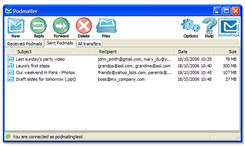
Podmailing "is a tiny software that empowers you to share files by e-mail - regardless of their size - without clogging your inbox."


I have used this in the past when colleagues and I were working various projects and needed to send large files through email. Sometimes zipping certain files still doesn't reduce the size (ie: images that need to have the layers maintained.) I have also used it when I send pictures back to friends and family overseas.

Tuesday, November 07, 2006

Free Personal Start Webpage with Protopage

What do you have your homepage set to when you open your browser? Google, Yahoo.....why not set it up to something that will get you started right in the morning and keep you up to date throughout the day.

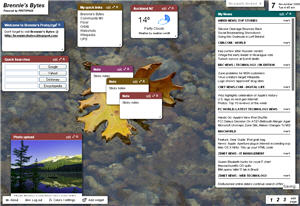
Protopage is just that FREE (yes folks I said free) web application to do just that.

It takes about 5 seconds to register (depending if you are a 2 or 3 finger typer), wait for the registration email and and then you can quickly setup your own personalized "start page."

I love this application and have it set on all my computers as my first start up page....I am able to subscribe to all my blogs (news feeds), add personalized pictures, create daily sticky notes for myself, quick links to web pages, view the weather, add quick web searches AND as many pages as I like. These categories are called widgets and you can change your widgets and page colours and move these widgets around freely on your page to organize according to your mood - you can make your pages private 0r public.

As this is a web application I can access it on any computer....anywhere....anytime. Love this!

Tuesday, October 31, 2006

New Life for Old Books

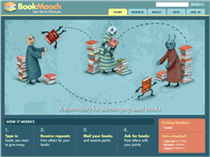
BookMooch.com is a website that has arrived in what I think is a very timely matter. When I think of all the books that I had to either give or throw away when I moved across the world it made me very sad. If you are like me and have taught a variety of subjects over the years and have a variety of interests...then you will have a lot of books. Now you have an option other than the corner used book store.

BookMooch is an online community for exchanging used books. There is a point system for members....every time you give a book away you get a point. You can also receive points by donating your books to charities. Your only cost is the mailing of the book...which from New Zealand can be sometimes pricier than the book (although you do get more points if you send your book to a different country).

The founder (John Buckman) stated he was was" frustrated by the vast number of books that were printed in just one country but not any other, or only after several years."

Where there's a will there is a way.....let's find those previously loved books a new home!

Happy Halloween

Wednesday, October 25, 2006

Cropper...Free Windows Tool

All Mac users know that they just need to activate shift+apple+4 and they get a cropping crosshair built into their operating system. Windows users need a bit more help....Cropper to the rescue!


Cropper is a screen capture utility written in C# on the Microsoft .Net platform. It makes it fast and easy to grab parts of your screen. Use it to easily crop out sections of vector graphic files such as Fireworks without having to flatten the files or open in a new editor.

Monday, October 23, 2006

Hotel Chain Explores Virtual Market Research

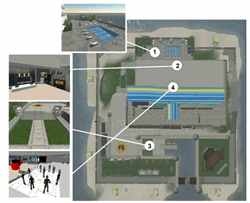
Starwood Hotels which includes chains such as the Westin, Sheraton, W Hotels, St. Regis....to name a few, has gone virtual. The ALoft Hotel (a vision of W Hotels) is a new hip hotel that will be built for the IT savvy and open in 2008. The rooms will be designed in a loft-like setting and feature well designed work-spaces, over sized showers, flat panel TVs, cordless phones, plug&play access for mobility devices, and hotel-wide wireless access...are just a few of the amenities.

ALoft Hotel opened their virtual test market hotel in SecondLife. (Note: SecondLife is a 3D online digital world that is imagined, created & owned by its residents. Last posting showed there were 1,097,243 residents, 474,480 US$ spent in the last 24 hours and there were 452,861 residents logged in last 60 days.)

This has taken market research to a new level. Online SecondLife'ers' will be able to explore the new hotel before it has been built. They are encouraged to submit comments and suggestions to the developers. They are able to explore most of the hotel. No one can book rooms through SecondLife as no one sleeps in the virtual world.

ALoft Hotel (virtual) has been built and will continue to evolve online, by a 3D company using the actual blueprints and specs that will be used for the real-world hotel. ALoft Hotel has published a weblog where you can follow along with the development from virtual to real-world hotel. Read more about the virtual-to-real world hotel concept at 4Hoteliers.com

Thoughts: Is this the direction of our future schools? Will teachers be waking up in the morning...shuffle to their computer with coffee in hand and housecoat still on...turn on their computer and greet their virtual classroom through their virtual self? Some universities already have campuses in SecondLife. Check out the price of real estate in SecondLife....it's not cheap (although there is educational pricing). Maybe one should jump into the real estate market now...remember location, location, location.

Wednesday, October 11, 2006

K-12 Online Conference

The first annual “K12 Online 2006″ convention for teachers, administrators and educators around the world interested in the use of Web 2.0 tools in classrooms and professional practice. This year’s conference is scheduled to be held over two weeks, Oct. 23-27 and Oct. 30- Nov. 3 with the theme “Unleashing the Potential.” The K12 Online 2006 blog has just gone live.

Information .pdf flyer available.

On the conference blog you will also find the web form we will be using for the submission of proposals. Everyone is encouraged to submit a proposal. More details are on the conference blog: www.k12onlineconference.org. The blog will be updated regularly with everything you need to know about the conference.

Tuesday, October 03, 2006

Sakai

Sakai is an online Collaboration and Learning Environment. Many users of Sakai deploy it to support teaching and learning, ad hoc group collaboration, support for portfolios and research collaboration.
A set of generic collaboration tools forms the core of Sakai:
AnnouncementsDrop, BoxEmail, ArchiveResourcesChat RoomForums, Threaded Discussion, Message Center, Message Of The Day, News/RSS, Preferences,
Presentation, Profile/Roster, Repository Search, Schedule, Search, Web Content, WebDAV, Wiki, Site Setup.

The core tools can be augmented with tools designed for a particular application of Sakai.
Teaching Tools:
Assignments, Grade book, Module Editor, QTI Authoring, QTI Assessment, Section Management, Syllabus
Portfolio Tools:
Forms, Evaluations, Glossary, Matrices, Layouts, Templates, Reports, Wizards.

Thursday, September 21, 2006

Cmap Tools

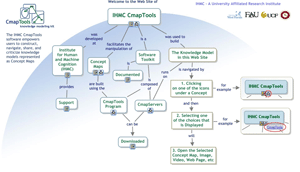
Cmap Tools ia a free knowledge modeling kit. It helps users to construct, navigate, share, and criticize knowledge models represented as Concepts Maps.

Use in the classroom for any student collaboration or brainstorming project. ICT students can use this to help build any of web or multimedia projects.